

d-kimuson/motion-kit
🏪MarketplaceAgent-first programmatic video framework on a deterministic timeline
Add this Marketplace
/plugin marketplace add d-kimuson/motion-kitThen open /plugin in Claude Code to pick and install its plugins.
Plugins in this Marketplace1
README.md
View on GitHub →motion-kit
An agent-first framework for programmatic video.
Your coding agent writes the scenes in React/TSX, looks at its own frames, and renders the MP4.




Watch the example videos, each rendered from this repository.
Getting started
motion-kit is meant to be driven by a coding agent. Add the motion-kit skill and ask for a video;
the skill tells the agent how to set up a project, run the CLI and read the guides that ship with the
package.
npx skills add d-kimuson/motion-kit
Or as a Claude Code plugin:
/plugin marketplace add d-kimuson/motion-kit
/plugin install motion-kit@motion-kit
To try it without installing the skill, point the agent at it in your prompt:
Make a 15-second launch video for my CLI tool with motion-kit.
Reference: https://raw.githubusercontent.com/d-kimuson/motion-kit/main/skills/motion-kit/SKILL.md
How it works
1. The agent writes the video as React
A video is a Composition: a React component plus its size, frame rate and duration, exported from an entry file. Every frame is a pure function of time, so the same frame always renders the same pixels.
// entry.tsx
import { defineComposition, defineCompositions, useTime } from '@kimuson/motion-kit';
import { easing, interpolate } from '@kimuson/motion-kit/motion';
import { z } from 'zod';

const props = z.object({ title: z.string().default('Hello from motion-kit') });

const Scene = ({ title }: z.infer<typeof props>) => {
  const opacity = interpolate(useTime(), [0, 0.6], [0, 1], { easing: easing.easeOutCubic });
  return (
    <div
      style={{
        width: '100%',
        height: '100%',
        display: 'grid',
        placeItems: 'center',
        background: '#07080c',
        color: '#f8f8f8',
        fontFamily: 'system-ui, sans-serif',
        fontSize: 96,
      }}
    >
      <p style={{ margin: 0, opacity: opacity.ok ? opacity.value : 0 }}>{title}</p>
    </div>
  );
};

export const compositions = defineCompositions([
  defineComposition({
    id: 'hello',
    component: Scene,
    schema: props,
    width: 1920,
    height: 1080,
    fps: { numerator: 30, denominator: 1 },
    durationInFrames: 150,
  }),
]);
2. The agent checks its own frames
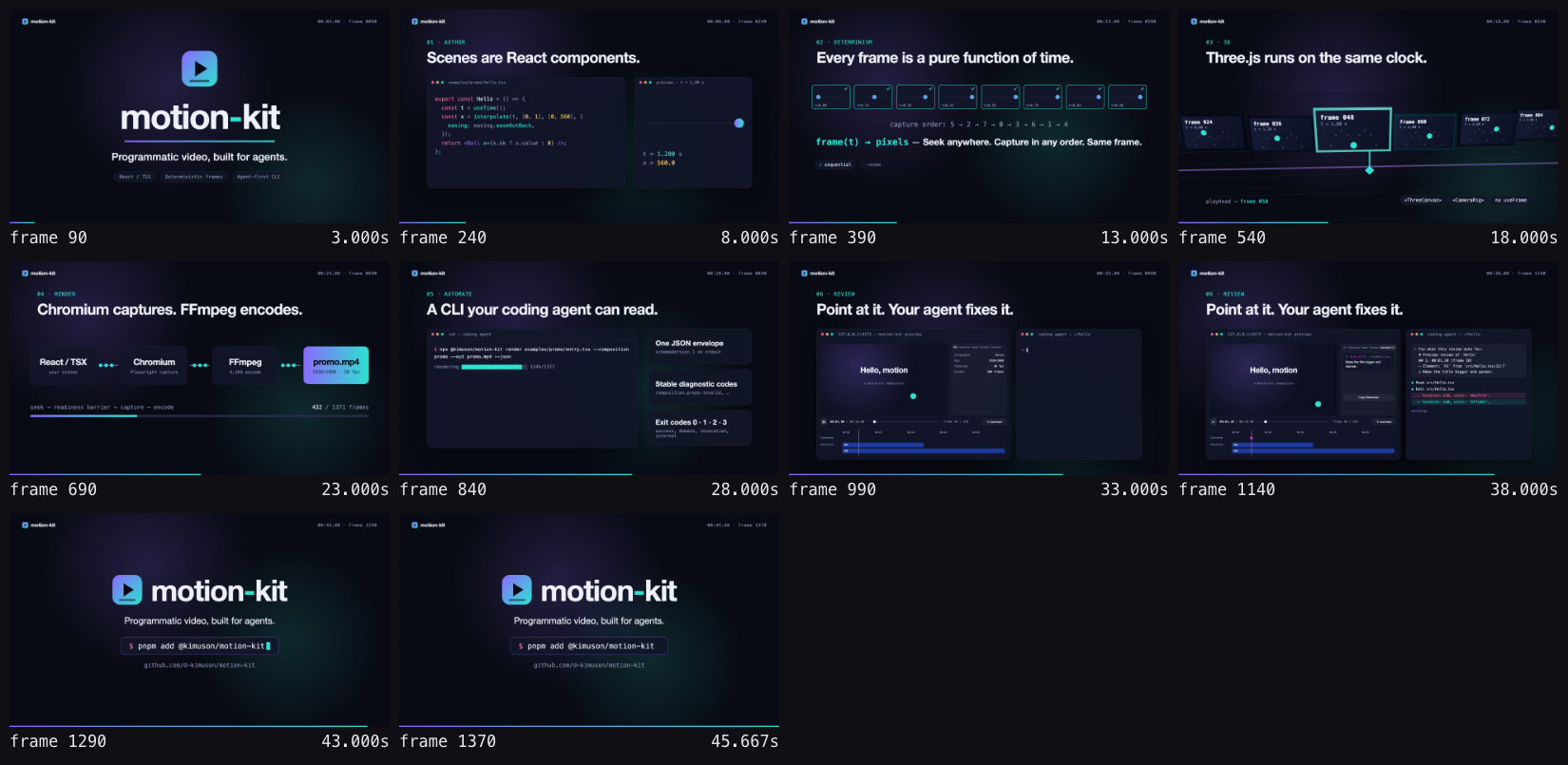
contact-sheet samples the timeline into one labelled PNG, so the agent sees the whole flow in a
single image instead of watching a video. frame captures any one frame the same way.
npx @kimuson/motion-kit contact-sheet entry.tsx --every 30 --out sheet.png
The sheet of the 46-second promo video in examples/promo:
3. You review in the preview and hand comments back
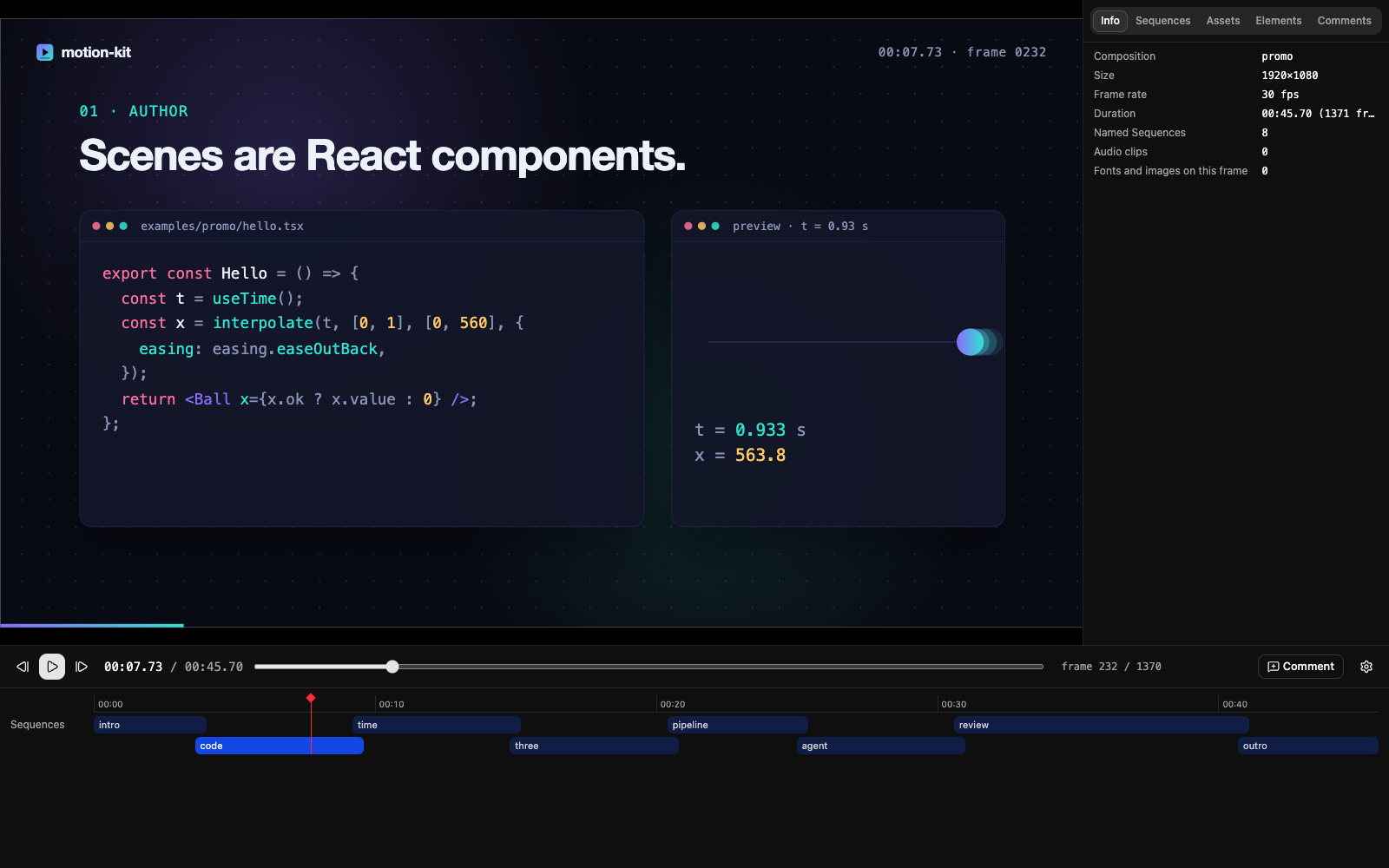
preview serves a page where you scrub and play the Composition with its audio and a timeline of its
Sequences. Click an element to comment on it, then Copy Markdown: each comment carries its time, the
JSX file and line, and a motion-kit frame command, ready to paste back to the agent.
npx @kimuson/motion-kit preview entry.tsx
4. The agent renders the MP4
npx @kimuson/motion-kit render entry.tsx --out out.mp4
Every command takes --json and answers with one versioned envelope, and a failure is a Diagnostic
with a stable code and a hint rather than a stack trace. That is what lets the agent go round
write, check and fix on its own.
Documentation
The guides ship inside the npm package and npx @kimuson/motion-kit docs prints them, so the agent
reads the guide of the version it runs.
- Documentation index — requirements, a quickstart and the package surface
- Getting started · Authoring · CLI · Three.js · Determinism · Troubleshooting
- Examples — four reference videos and a promo showcase under
examples/ - Changelog
Contributing
Working on motion-kit itself (setup, building, testing) is covered in dev-docs/README.md.